Table of Content
Introduction
Terminator is my personal choice for terminal as I can easily split multiple terminal in a single tab. However, this would also work with the default terminal for Kali Linux which is QTerminal.
1. Backup
First, create a backup of your .zshrc file
cp ~/.zshrc ~/.zshrc.bak2. Setup
Edit the .zshrc file using nano.
nano ~/.zshrcNavigate to the end of the file and add the following code:
# Print timestamp before every command outputpreexec() {    local ts=$(date "+[%Y/%m/%d %I:%M %p]")
    print -P "%F{green}${ts}%f %F{blue}${USER}@${HOST}%f:%F{green}${PWD}%f%F{blue}\$%f $1"}
Feel free to customize the format to your liking.
3. Apply changes
Apply the changes using the command below:
source ~/.zshrc4. Test
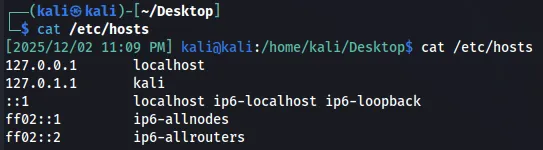
To test, execute any command. In this example, i used cat /etc/hosts.
┌──(kali㉿kali)-[~/Desktop]└─$ cat /etc/hosts[2025/12/02 11:09 PM] kali@kali:/home/kali/Desktop$ cat /etc/hosts127.0.0.1 localhost127.0.1.1 kali::1 localhost ip6-localhost ip6-loopbackff02::1 ip6-allnodesff02::2 ip6-allroutersThe output should now display a timestamp before each command, as shown in the image below.